About CardWorks Plus Edition for Mac
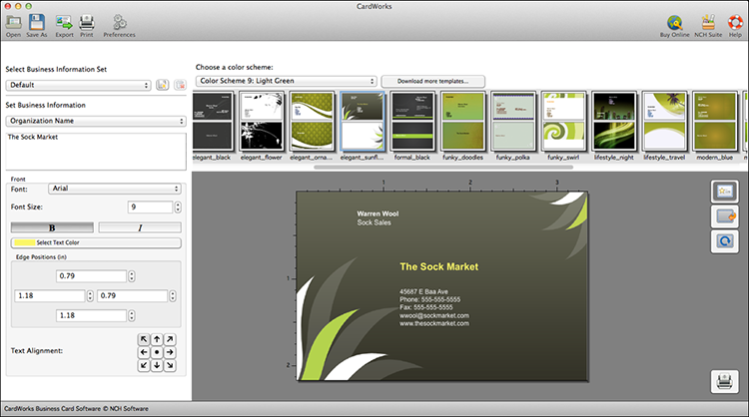
CardWorks Plus Edition for Mac allows users to design and print your own business cards. With an extensive range of business card templates, CardWorks makes it easy to design business cards that fit your personal or...
CardWorks Plus Edition for Mac allows you to design your own printable business cards. Easily create your own business cards with a wide range of business card templates. CardWorks makes it easy to design business cards to fit your corporate or personal brand image. This software gives your customers and business contacts easy access to your contact information. All standard sizes of business cards supported. Export your business card files and have them professionally printed or print them yourself.
CardWorks Plus Edition for Mac Features:
* Wide selection of business card templates included
* Adjust color scheme of templates.
* All paper sizes and standard business card sizes supported.
* Create double or single-sided business cards.
* Store address and names for easy access.
* Add company logos, photos, or other picture formats (jpg, gif, tiff, bmp, and png).
* Print with crop marks for easy trimming
* High-resolution PDF exports for portability
Previous Versions
Here you can find the changelog of CardWorks Plus Edition for Mac since it was posted on our website on 2022-10-21 17:02:38.
The latest version is 4.01 and it was updated on 2024-04-22 23:54:54. See below the changes in each version.
CardWorks Plus Edition for Mac version 4.01
Updated At: 2018-11-01
Changes: Major Update
Disclaimer
External Download
We do not host CardWorks Plus Edition for Mac on our servers. We did not scan it for viruses, adware, spyware or other type of malware. This app is hosted by the software publisher and passed their terms and conditions to be listed there. We recommend caution when installing it.
The external download link for CardWorks Plus Edition for Mac is provided to you by apps112.com without any warranties, representations or guarantees of any kind, so access it at your own risk.
If you have questions regarding this particular app contact the publisher directly. For questions about the functionalities of apps112.com contact us.